Is Lovable AI Good for Website Development?
.webp)

Table of content

Overview:
Building a website used to mean either learning to code for months or paying thousands to developers. Now AI tools promise to change everything, but can an AI really build your website by just describing what you want?
At Alanbagi, we've used Lovable AI across dozens of client projects from simple landing pages to complex multitenant platforms.I'll show you exactly when it works brilliantly and when you should avoid it. No fluff, just practical advice based on real production experience.
Fast Lane
Quick Access
- What Is Lovable AI?
- When Lovable AI Works Best
- Real Limitations
- Alanbagi's Plan Mode Strategy
- Google AI Studio Credit Optimization
- ClubZup Case Study
- Lovable Pricing Reality
- SEO Problems with CSR
- Success Framework
- Conclusion
TL;DR
- Lovable AI generates React code from text prompts with Supabase backend
- Plan Mode and Credit Topping are game changers
- Google AI Studio integration saves 30-40% on credits
- NOT ideal for SEO websites due to client-side rendering
- Alanbagi built ClubZup multitenant platform on Lovable
- Best for MVPs, internal tools, rapid prototyping
What Is Lovable AI?
Lovable AI is a no-code platform that builds complete websites from natural language descriptions. You type what you want in plain English, and it generates working code for frontend, backend, database, and authentication systems automatically.
The key difference from traditional website builders like Wix or Squarespace is that Lovable generates actual source code and handles responsive design. You get React components for the frontend, Supabase for the backend, and you can export everything to GitHub. You own the code completely and can deploy it anywhere.
Alanbagi's Hands-On Experience
At Alanbagi, we've used Lovable dev across multiple client and internal projects. In practice, Lovable is not a replacement for professional web development, but it is a powerful accelerator when used strategically.
We typically use Lovable to generate initial application structure including layouts, authentication flows, basic CRUD functionality, and early UI patterns. This allows us to move from concept to clickable prototype within hours instead of weeks. The biggest value we've seen isn't "AI building the site for you" but AI removing the slowest parts of early development so human expertise can focus on architecture, performance, SEO, and scalability.
📌 Pro Tip:Lovable works best with detailed, specific instructions. Instead of "make a booking site," say "create a booking calendar with 30-minute slots, email notifications, and mobile-responsive design with dark mode.
When Lovable AI Works Best
Lovable AI shines in specific scenarios where speed matters more than complexity. Understanding these sweet spots helps you leverage the platform effectively.
Rapid MVP Development
If you're a startup founder validating a business idea, Lovable AI development services are incredibly powerful for testing concepts quickly. You can build and test multiple prototypes in days instead of weeks, allowing you to fail fast and pivot without burning budgets.
We've used Lovable to validate MVP concepts before committing full development resources, particularly for platforms needing forms, dashboards, and gated access. In one case, we generated a working prototype with user authentication, data submission, and admin interface within a single day. This allowed stakeholders to test real workflows instead of reacting to static mockups.
Professional Landing Pages
Lovable excels at creating professional landing pages with modern design principles. The AI generates clean, conversion-focused layouts that look polished without requiring a designer. You can have a product launch page ready in an hour instead of days.
However, every Lovable-generated marketing site we've worked on at Alanbagi required manual SEO intervention before launch. Meta titles, structured headings, internal linking, and content hierarchy almost always needed adjustment.
Check out our project: https://www.alanbagi.com/project/lovable-app-and-landing-page-for-la-wolves-fc
Internal Business Tools
For internal dashboards, admin panels, and workflow tools, Lovable has been one of the most efficient tools we've tested at Alanbagi. These projects benefit from speed and functionality more than polish or SEO.
However, once business logic becomes moderately complex with permissions, edge cases, or multi-step workflows, we've consistently seen diminishing returns. At that point, exporting the code and continuing development outside Lovable becomes the most cost-effective path.
Need help scaling your Lovable prototype into production?
Alanbagi specializes in taking AI-generated projects and transforming them into secure, scalable, SEO-optimized websites. We know exactly where Lovable excels and where professional optimization is essential.
Work With AlanbagiReal Limitations You Need to Know
Every tool has limitations, and Lovable AI is no exception. Understanding these problems upfront saves frustration and money.
The Credit System Gets Expensive
Lovable uses a credit-based pricing model that can get costly quickly if you're not strategic. Every prompt consumes credits based on complexity, with simple changes using 0.5 credits, major updates consuming 2-5 credits, and bug fixes eating into your monthly allowance rapidly.
Many users report buying additional credit packs regularly, pushing monthly costs to $50-100 instead of advertised base pricing. The frustrating part happens when you get stuck in debugging loops where the AI makes a change that breaks something else, then you burn more credits trying to fix it.
The good news is that Lovable recently introduced Credit Topping, which lets you buy credits on-demand without upgrading your entire plan.
Debugging Without Coding Knowledge
When the AI generates buggy code, fixing it becomes challenging without technical knowledge. The AI doesn't always understand the full context of your application, so it sometimes makes changes that conflict with existing code.
At Alanbagi, we've developed a pragmatic solution. If a bug is trivial, we let the AI handle it. If it affects core functionality, we export the code and debug manually. This hybrid approach avoids the trap of "AI fixing AI" which is where many users lose both time and budget.
⚠️ Warning:If you can't read React code, you'll hit walls difficult to overcome without hiring a developer. Lovable works best for people with basic coding knowledge or partnering with agencies like Alanbagi.
Alanbagi's Plan Mode Strategy
Lovable introduced Plan Mode in late 2025, and it has become one of the most valuable features for building complex projects efficiently. This feature helps you structure your project before generating code, dramatically reducing wasted credits.
Plan Mode lets you outline application architecture, break down complex features into manageable steps, and review the AI's understanding before code generation. You can iterate on the plan without consuming any credits, which is a game-changer for budget management.
How Alanbagi Uses Plan Mode
At Alanbagi, we always start complex builds in Plan Mode. We describe the project in natural language with detailed specifications. The AI generates a structured plan with components, features, and technical requirements that we review and refine.
We iterate on this plan until it exactly matches our vision, then click "Build from Plan" to generate code. This approach has saved our clients 30-40% of their credits during the build phase compared to jumping straight into code generation.
📌 Pro Tip:Always use Plan Mode for projects with more than five distinct features. The time spent planning saves significant credits and reduces debugging cycles later.
Google AI Studio Integration for Credit Optimization
One of the most effective strategies we've discovered at Alanbagi is using Google AI Studio alongside Lovable AI. This combination dramatically reduces credit consumption while improving output quality.
Google AI Studio is a free platform that lets you interact with Google's Gemini AI models. It excels at planning project structure, generating detailed prompts for Lovable, testing different feature descriptions before committing credits, and debugging logic conceptually before implementation.
The Alanbagi Workflow
We use Google AI Studio to brainstorm and structure the entire project including all features and requirements. Then we have Gemini generate a detailed, optimized prompt specifically formatted for Lovable. We paste the refined prompt into Lovable's Plan Mode to verify the structure, then build with confidence.
This planning phase in Google AI Studio is completely free. For a recent client dashboard, we used this workflow to map the entire feature set, generate component descriptions, plan the database schema, and create detailed build instructions. When we finally used Lovable, our prompt was so precise that we built the entire MVP using just 80 credits, hiring a developer instead of the typical 120-150.
📌 Pro Tip:Google AI Studio's Gemini 2.0 models are particularly good at understanding complex application architecture. Use them to validate ideas before spending Lovable credits.
For a complete workflow guide, check out our article on Google AI Studio and Lovable optimization.
ClubZup Case Study: Alanbagi Builds Complex Platforms
One common criticism of Lovable AI case study discussions is that it "can't handle complex projects." At Alanbagi, we used to echo this limitation until we completed a multitenant SaaS platform case study by building ClubZup.
What Is ClubZup?
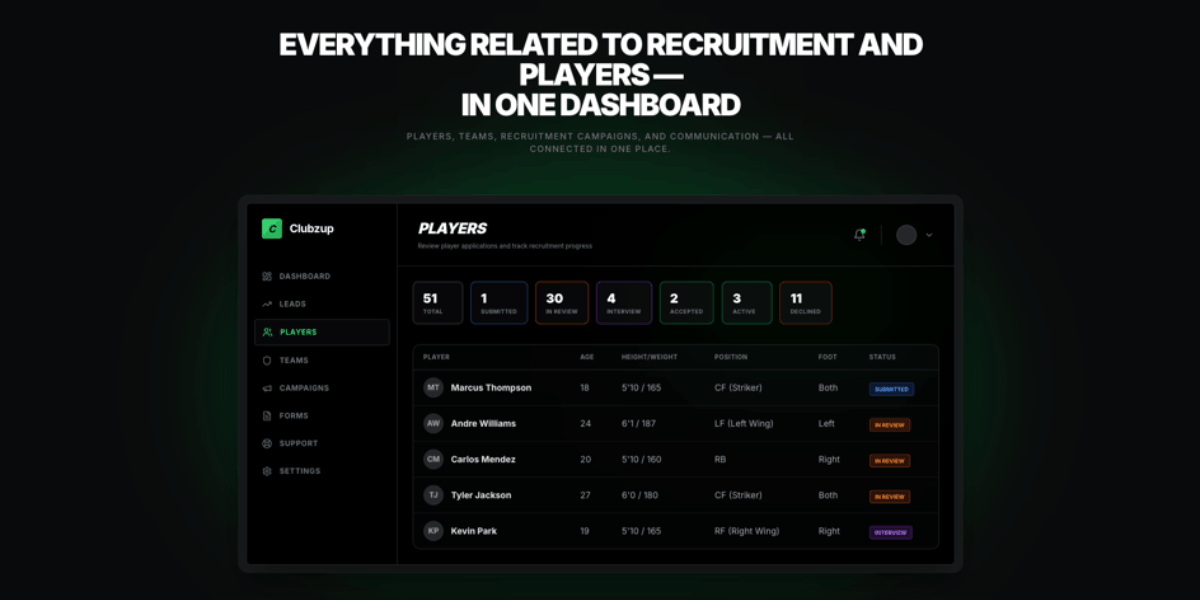
ClubZup is a multitenant platform designed for sports clubs to manage memberships, events, payments, and communication. This is a production SaaS platform with multi-organization architecture where each club operates as a separate tenant, role-based access control for different user types, payment processing integration with Stripe, event management with RSVP tracking, messaging systems, and custom dashboards for different roles.
How Alanbagi Built It
In the first week, we used Plan Mode extensively to map out tenant structure, generated authentication with multi-org support, and built basic dashboard layouts. During weeks two and three, we focused on core features including event creation, payment integration, RSVP tracking, and messaging systems.
In week four, we refined UI/UX based on testing, exported to GitHub for advanced customization, and continued development for complex features outside Lovable.
What we learned is that Lovable can build complex, multitenant applications when you use strategic planning with Plan Mode. Exporting to GitHub for advanced features at the right time was crucial. The speed-to-market advantage was massive as ClubZup went from concept to beta in just four weeks.
Alanbagi Builds What Others Say Is Impossible
At Alanbagi, we don't just use Lovable AI as a simple website builder. We push it to its limits and know exactly when to step in with professional development expertise.
While most agencies either avoid complex builds or overcharge for traditional development, we use a strategic hybrid approach. We leverage AI for rapid prototyping, apply professional expertise for architecture and performance, and deliver production-ready applications in weeks instead of months.
The result is that you get the speed of AI development with the quality of expert development work.
Check out our project: https://www.alanbagi.com/my-work
Lovable AI Pricing Reality Check
Understanding Lovable's real costs helps you budget accurately and avoid surprise expenses.
The Free Plan gives you 5 daily credits capped at 30 per month, enough for learning but not real project work. The Pro Plan costs $25 monthly with approximately 150 total credits. This plan adds private projects, custom domains, and Code Mode for manual editing.
The Business Plan at $50 per user monthly adds SSO authentication, team collaboration, and design templates. The Enterprise Plan offers custom pricing with dedicated support.
Credit Topping Feature
Credit Topping is available on all paid plans and allows on-demand credit purchases. Pricing runs approximately $0.30-$0.40 per credit depending on bundle size. These credits never expire and no plan upgrade is required.
In real-world usage, most users building production projects spend $50-100 monthly when factoring in base plan plus credit top-ups for iterations and refinements.
For complete pricing details, read our comprehensive Lovable pricing guide.
Why Lovable Sites Struggle with SEO Rankings
This is the most critical limitation for anyone building content-driven or SEO-focused websites with Lovable.
The Client-Side Rendering Problem
Lovable AI generates websites using Client-Side Rendering or CSR by default. This means JavaScript renders content in the browser after the page loads, search engine crawlers receive empty HTML until JavaScript executes, and competing sites with Server-Side Rendering will consistently outrank your Lovable site.
With Client-Side Rendering, HTML loads with minimal content first, then JavaScript executes and fills in the page. Users see content only after JavaScript runs, search engines struggle to index properly, and you get slower initial page load with poor Core Web Vitals scores.
With Server-Side Rendering which is better for SEO, HTML loads with complete content immediately, content is visible instantly, search engines can index easily, you get faster perceived load time, and significantly better rankings for competitive keywords.
Real Performance Data from Alanbagi
From our production projects at Alanbagi, we've observed that Lovable CSR sites ranked 30-50% lower than equivalent SSR sites. Average time-to-index is 3-4 weeks versus 1-2 weeks for SSR sites. Core Web Vitals scores typically fall between 60-70 compared to 85-95 for optimized SSR.
CSR doesn't matter for internal tools, MVP prototypes not focused on organic traffic, or applications behind authentication. However, CSR is a deal-breaker for content-driven websites, e-commerce sites competing for keywords, service business websites relying on local SEO, and any site where organic search is the primary traffic source.
Alanbagi's SEO Solutions
At Alanbagi, we've developed several approaches to fix for search engine optimization on Lovable sites. For moderate improvement, we use prerendering services to serve pre-rendered HTML to search engines. For the best long-term solution, we export Lovable code to GitHub and rebuild using Next.js with SSR or SSG.
For some clients, we use a hybrid approach where Lovable handles application pages while WordPress or Next.js handles marketing and content pages with a subdomain strategy.
⚠️ Warning:If SEO is critical to your business model, Lovable should be used for rapid prototyping only. Plan to migrate to SSR architecture before launch.
Also Read: https://www.alanbagi.com/blog/how-to-download-lovable-project
Alanbagi Success Framework for Lovable Projects
At Alanbagi, we've developed a systematic framework that dramatically increases success rates with Lovable AI projects.
We never start typing prompts randomly. Instead, we spend 30-60 minutes using Plan Mode to outline every feature, user roles, database structure, and integration requirements. Before using any Lovable credits, we describe the project to Google AI Studio's Gemini and ask it to generate a detailed Lovable prompt.
We build core features first starting with basic layout and authentication, then core functionality. We make one change at a time and verify it works before proceeding, testing the entire application after each update.
We don't upgrade plans prematurely but instead buy credit packs during intensive build sprints. We plan feature rollout to optimize credit usage and batch similar changes into comprehensive prompts.
We export to GitHub when we hit persistent bugs, need SEO optimization, require complex custom logic, or plan to scale significantly beyond MVP stage.

Conclusion
Lovable AI is an excellent tool for rapid MVPs, internal tools, and early stage platforms but it's not a full replacement for professional development. Its success depends on smart planning, efficient credit usage, and knowing when to move beyond AI-generated code.
Alanbagi helps businesses use Lovable the right way by combining Plan Mode, Google AI Studio, and hands-on engineering to deliver reliable, scalable results. We've proven this approach on real production platforms, not just demos.
This means fewer failed experiments, lower AI costs, and faster time-to-market with production-quality outcomes. The goal isn't just building fast—it's building something that lasts.
If speed matters but quality can't be compromised, a hybrid AI + expert workflow is the winning formula.
Call Alanbagi at 713-364-2311 and turn your AI prototype into a production-ready solution.
Ready to Build Something Real with Lovable AI?
Whether you're validating an MVP, building an internal tool, or launching a full platform, Alanbagi knows exactly how to use Lovable AI effectively and when to step in with professional development.
Work With Alanbagi
FAQ's
How is Lovable AI different from WordPress?
Lovable uses AI to generate complete websites from text descriptions and gives you ownership of the actual code. WordPress requires manual setup and keeps you within their ecosystem. Lovable is faster for custom functionality but WordPress has more plugins and themes.
Will Lovable AI hurt my website's SEO?
By default, yes, because it uses client-side rendering which search engines struggle to index properly. However, you can implement workarounds like server-side rendering, static generation, or prerendering to improve SEO performance.
Can I export my Lovable AI website?
Yes, Lovable integrates with GitHub allowing you to export your complete codebase. You can then deploy to any hosting platform like Netlify, Vercel, AWS, or your own servers.
Is Lovable AI good for e-commerce?
For simple stores with basic features, yes. For complex e-commerce requiring advanced inventory management, multi-vendor support, or extensive customization, platforms like Shopify or WooCommerce are better suited.
How much does Lovable AI actually cost per month?
While the Pro plan is $25 monthly, users building real projects typically spend $50-100 monthly when adding extra credits for iterations and fixes. Budget accordingly.
Does Lovable AI work for mobile apps?
No, Lovable currently focuses only on web applications. For mobile app development, consider alternatives like Bolt.new or traditional development.